Using the Range Command to Determine the Distance between Modems
Next, we'll use the range command to estimate the distance between the modems. Modem 1 sends a range request, Modem 2 replies, and Modem 1 calculates the distance from the round-trip time and the configured speed of sound.
Ranging is a two-way exchange, so each modem must be addressed to the other.
-
On Modem 2, change the Remote ID to 10 (Modem 1) so that Modem 2 can reply to the range request.
-
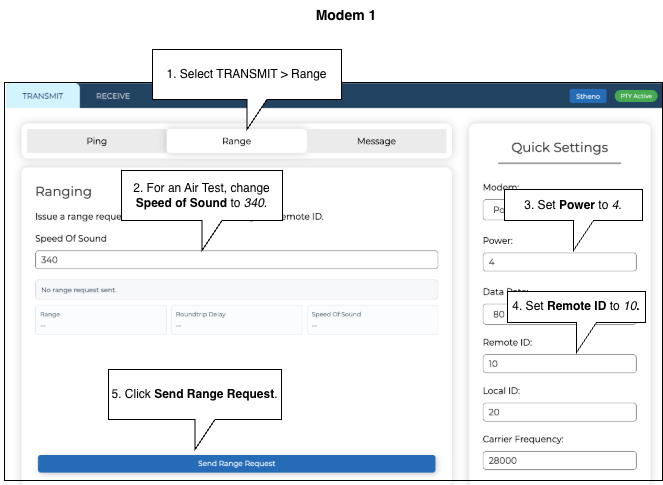
On Modem 1, on the Comms screen, select the TRANSMIT tab then select Range.
-
For an air test, change the value in the Speed of Sound to 340.
-
Change the Power setting to 4.
-
Confirm that the Remote ID is set to 20 (Modem 2).
-
Click Send Range Request.
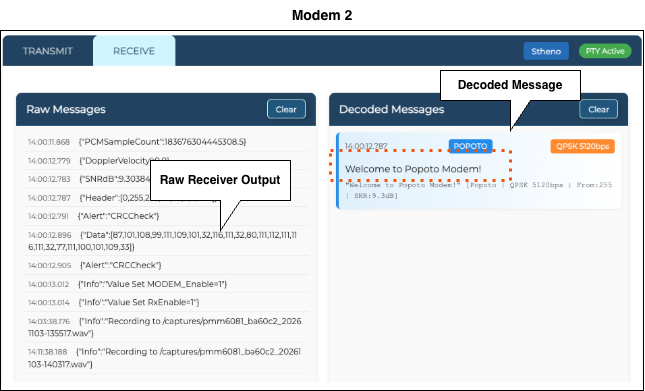
The raw messages display in the RECEIVE window for Modem 2.
The range result is displayed in Modem 1's Range tab:
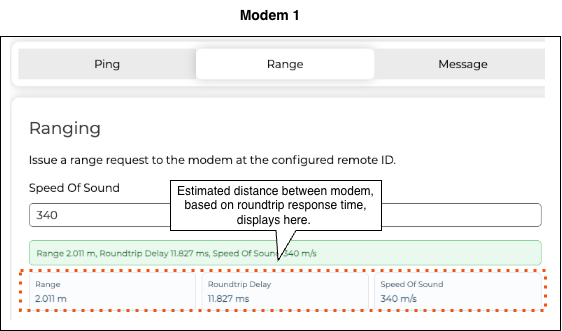
For enclosed modems, the range may be higher than expected due to the positioning of the transducer and the enclosure affecting the acoustic signal.
When calculating the round-trip time, Modem 1 accounts for Modem 2's turnaround time before converting the result to distance.
Reset Speed of Sound
After performing the range test, change the Speed of Sound back to 1500 for deployment in water.
Next: Now we'll use the Signal Monitor page to check that the receiving modem can detect the other modem’s transmission, that the signal appears in the expected frequency range, and that it stands out from background noise.
Continue to Checking Acoustic Signal Quality.