Communicating with a Popoto System
The Popoto system consists of several components working together to create an acoustic digital communication system.
At the lowest level, a transducer provides the physical interface between the modem and the water. This transducer is connected to the analog board, which can drive the transducer as an output and receive from the transducer as an input.
The analog board digitizes received acoustic signals and passes the resulting data to the digital board. The digital board performs acoustic signal processing and manages the modem behavior based on the current operating state.

JSON Messages
JSON (JavaScript Object Notation) is a lightweight format for storing and transporting data. It is self-describing and easy to understand.
JSON is built on two structures:
- A collection of name/value pairs. In various languages, this is realized as an object, record, or struct.
- An ordered list of values. In most languages, this is realized as an array, vector, list, or sequence.
High-level languages such as Python typically have JSON parsers available to parse JSON messages into language-native variables.
Socket-Based JSON
The common communication format for Popoto is JSON messages over sockets. Although there are many ways and APIs to communicate with Popoto, all of these methods and APIs reduce to creating or displaying a JSON message to or from a socket.
Popoto API Sockets
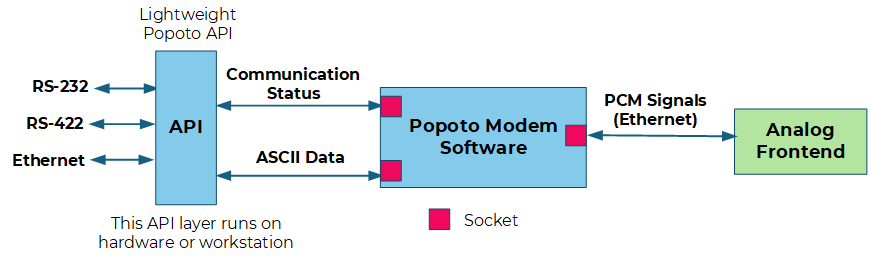
I/O to the embedded Popoto software is accomplished using IP sockets. Even analog signal data supports socket I/O. This provides flexibility for interface design, testing, software portability, and software test.
These sockets can also interface through a thin layer of code to provide familiar standard interfaces used in the field, such as RS-422. Sockets are specified by the IP address of the Popoto Modem as set by the user.
In addition to the IP address, the following ports are used:
| Port | Interface | Notes |
|---|---|---|
17000 | Command port | Primary command socket |
17001 | Data port | Telnet |
17002 | PCM logging port | Not for typical use |
17003 | PCM output port | Not for typical use |
17004 | PCM input port | Not for typical use |
Popoto Modem socket interfaces are shown in the following figure:
JSON Command Message
The basic structure for commanding Popoto Modems uses a JSON command message. This message consists of two parts: the Command keyword and the Arguments keyword.
The basic command structure is:
{
  "Command": "",
  "Arguments": ""
}
An example of a simple JSON command is the command to check the software version:
{
  "Command": "GetVersion",
  "Arguments": "Unused Arguments"
}
The modem responds with:
{
  "Info": "Popoto Modem Version 2.7.0"
}
Keyword Return Values
Popoto Modem returns information to the user using various keyword identifiers. These return keywords are designed to be self-identifying and can be used for user application parsing.
System-Level Variables
Popoto Modem contains various internal variables. These variables are mode variables, configuration variables, or parameters extracted from the signal.
Facilitating JSON Messages
The primary interface to the embedded Popoto algorithm is over sockets using JSON messages. To make interaction and automated development easiest for the user, Popoto provides APIs and a user shell called pshell. These APIs and shell form a thin layer that creates and interprets socket-based JSON messages.

For example, the popoto.py layer provides Python access and methods to create JSON messages. Importing this library gives a user full control over the Popoto Modem in the Python language.
A MATLAB API has also been generated. The structure of how it interacts with Popoto is the same.

Finally, a command shell called pshell has been written in Python, using the popoto.py API and the cmd command interpreter. This shell allows users to interact with the modem at a user level, typically through a serial connection. pshell is the default way for a user to interact with Popoto Modems.
