Changing the Local ID of a Modem
The Local ID is the modem's current ID. The factory default Local ID for a modem is 255.
The Remote ID is the ID of the modem you are sending to. A Remote ID of 255 is Broadcast mode: any modem can receive the transmission, regardless of its Local ID.
To communicate with a specific modem, give each modem a unique Local ID between 0 and 254, then set the transmitting modem's Remote ID to the receiving modem's Local ID. For this Getting Started procedure, we will assign a unique Local ID to each modem to enable direct communication between them.
The Local ID is a system variable, so you read and change it with the same commands described in Getting and Setting System Variables.
To change a Local ID of a modem using the Popoto pshell Interface:
-
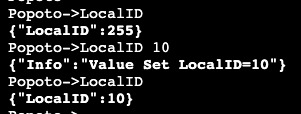
At the pshell prompt, enter the following command to retrieve the current Local ID:
LocalIDThis confirms that the Local ID is set to the default of 255.
-
To change the Local ID, enter the following command:
LocalID 10 -
Verify that the Local ID has been changed by entering the following command:
LocalIDThis should now display the new Local ID of 10.
This sequence of commands is shown in the following figure:
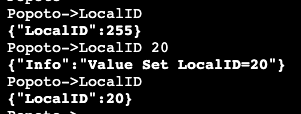
- Repeat the steps for modem 2, changing the Local ID to 20, as shown in the following sequence:
Now that we have changed the local ID's of each modem, we will use the IDs as the Remote ID in the air test procedures.
Continue to Sending your First Acoustic Message.