Using the Range Command to Determine the Distance between Modems
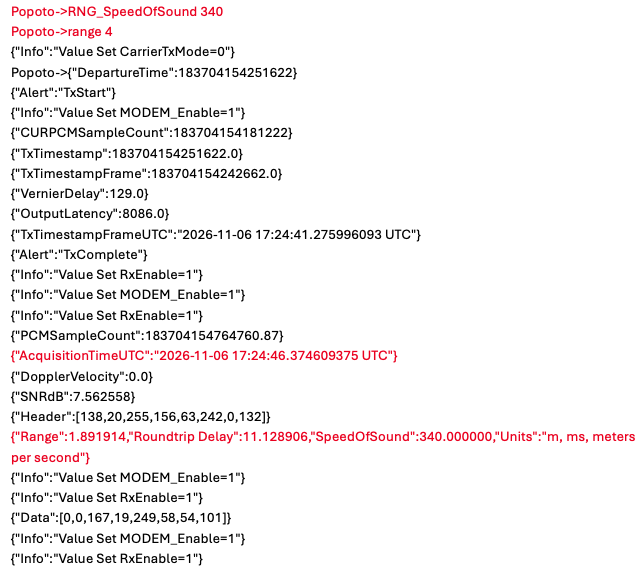
Next, we'll use the range command to estimate the distance between the modems. Modem 1 sends a range request, Modem 2 replies, and Modem 1 calculates the distance from the round-trip time and the configured speed of sound.
Ranging is a two-way exchange, so each modem must be addressed to the other. Modem 1 is already addressed to Modem 2 from the ping test.
To initiate a ranging cycle:
-
On Modem 2, set
RemoteIDto the Local ID of Modem 1 so that Modem 2 can reply to the range request:RemoteID 10 -
On Modem 1, change the Speed of Sound for the air test. The default setting is 1500; for a typical air test, use 340:
RNG_SpeedOfSound 340 -
On Modem 1, send the range request to Modem 2. For this example we will use a power setting of 4:
range 4
Upon successful demodulation of the range request, Modem 2 schedules a transmission back to Modem 1.
Example
Modem 1 (Transmission)
Modem 2 (Reception)
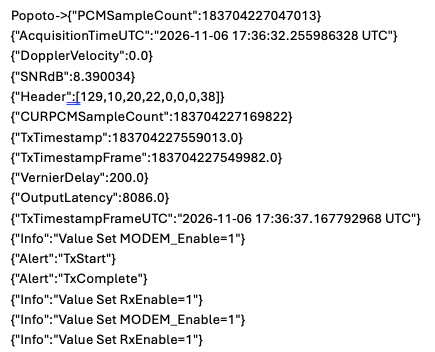
When calculating the round-trip time, Modem 1 accounts for Modem 2's turnaround time before converting the result to distance. The range report is displayed in Modem 1's pshell console.
Reset Speed of Sound
After performing this test, change the Speed of Sound back to 1500 for deployment in water.
RNG_SpeedOfSound 1500
Next: We'll use transmitJSON at the pshell prompt to send a test payload from one modem to another.
Continue to Sending a Test Payload.