Sending Your First Acoustic Message using pshell
First, we'll verify that the two modems can communicate by sending a short test message from Modem 1 to Modem 2.
When both modems are online and connected to their pshells, you can send an acoustic ping from one modem to the other to verify communication.
-
On Modem 1, set
RemoteIDto the Local ID of Modem 2, which we changed to 20:RemoteID 20Modem 1 now addresses its transmissions to Modem 2. This setting remains in effect for the rest of the air test.
-
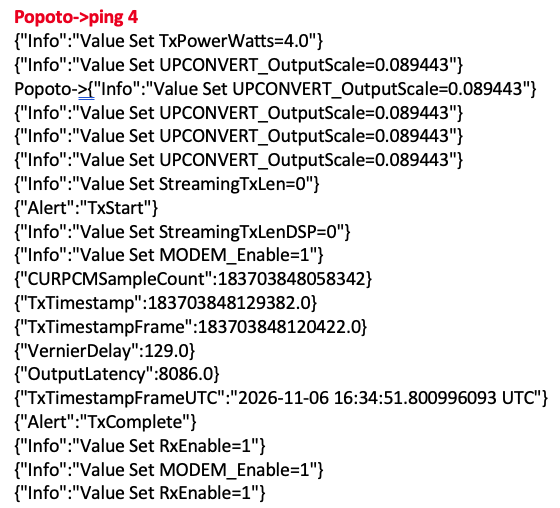
On Modem 1, send a ping:
ping 4This command initiates transmission of a test packet using transmit-power setting 4 on the software scale. Popoto transmit-power settings use a 1 to 100 scale. Setting 4 is a lower transmit-power setting suitable for many air tests with the units' transducers spaced 1-2 meters apart.
During transmission, the transmitter indicates that it is actively sending.
On a Deckbox, the receiver's pshell should indicate that it received a packet and display both the packet and header data.
Example
Modem 1 (Transmission)
Modem 2 (Reception)
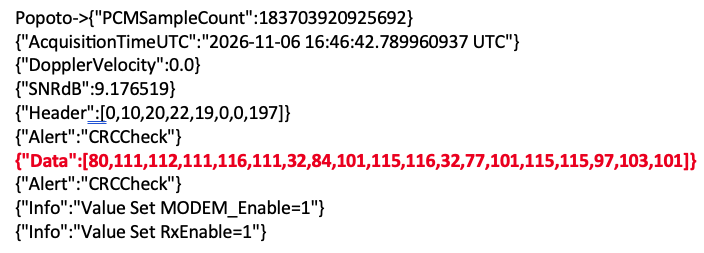
If the receiving modem reports a CRC error instead of a successful CRC check, room multipath may be preventing the demodulator from decoding the test packet. Reposition the transducers or pad reflective surfaces to reduce acoustic reflections.
Next: Now we'll determine the distance between modems with the range command.
Continue to Estimating the Range between Modems.