Choosing an Operation Mode
The flexibility of the Popoto system supports several use cases. Each use case applies to a different product scenario, so the requirements of the end product should be considered carefully when choosing an operating mode.
Local pshell
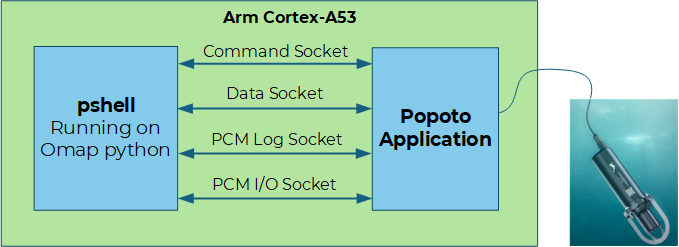
The pshell interface is a Python program that connects with the Popoto application and provides a shell interface to the modem command, status, and data interfaces. The shell provides simple commands, such as ranging and transmit power control, so the modem can be used under either human or computer control.
In this use case, the interface to the modem can be any of the following:
- Serial RS-232
- 4-wire RS-422
- Ethernet over SSH
- Ethernet over Telnet
The pshell interface runs co-resident with popoto_app on the Popoto Modem embedded Linux processor.
Remote pshell
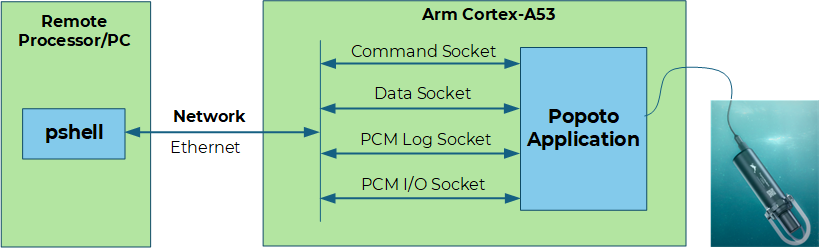
Remote pshell operates like local pshell, except the pshell Python program runs on a remote processor and connects to popoto_app over TCP sockets and networks.
Remote pshell is useful for streaming PCM directly to a PC hard drive. It is also a good choice for running regression tests, because the regression suites can live on the remote PC and log results there.
Matlab
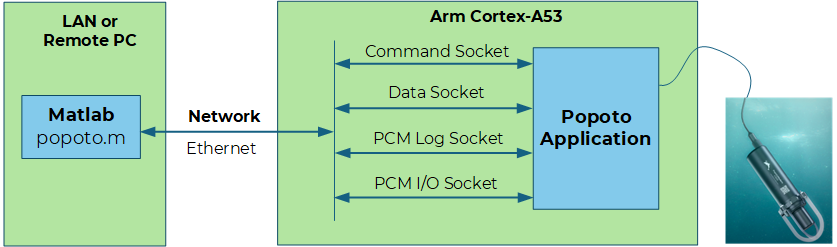
Matlab mode is similar to remote pshell mode, except the connection to popoto_app is made using Matlab instead of a Python program.
Matlab is useful for lab testing because it is a powerful and approachable language. Because Matlab requires a full PC and a licensed environment, it is less likely to be deployed in an end product.
Custom Interfaces
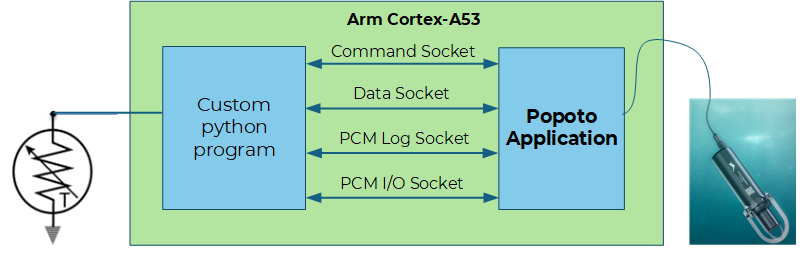
The Popoto system uses standard sockets for communication, so customers can create custom interfaces in the language of their choice. See the Popoto.py and Popoto.m files for implementation examples.