Setting the Payload Data Rate
Use the following commands to manage the payload mode:
| Command | Description |
|---|---|
help PayloadMode | Get the list of available payload modes in the current version |
PayloadMode | Get the current payload mode |
PayloadMode <int> | Set the payload mode, where <int> is the desired mode index |
About PSK Payload Packets
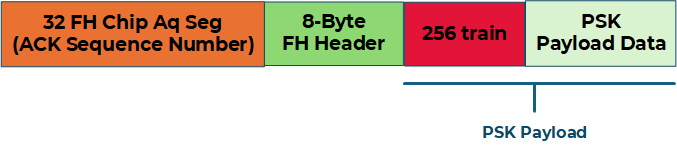
Each PSK payload packet consists of three parts:
- The acquisition sequence
- The header
- An optional payload
The acquisition sequence does not change for different data rates. The header is always sent in 80 bps frequency-hopping mode and contains information such as:
- Transmitter ID
- Intended receiver ID (
255is the broadcast ID) - Transmit power
- Whether a payload follows
- Payload length
- Payload modulation scheme
An example PSK payload packet is shown in the following figure:
Payload Modulation Schemes
To configure the modulation rate of the payload portion of the waveform, use the PayloadMode variable.
The modulation schemes are shown in the following table:
| PayloadMode | Modulation scheme |
|---|---|
0 | FH-FSK, 80 bps |
1 | QPSK, 5120 bps |
2 | QPSK, 2560 bps |
3 | QPSK, 1920 bps |
4 | QPSK, 1280 bps |
5 | QPSK, 10240 bps, convolutional coding disabled |
6 | BPSK, 2560 bps |
7 | BPSK, 1280 bps |
8 | BPSK, 960 bps |
9 | BPSK, 640 bps |
After the first ping, JSON message, or range command succeeds, refer to Configuring Payload Transmission Mode for payload mode selection, supported data rates, coding structure, and mode-selection guidance.